
WordPress Alternatives for Business







You've probably been told WordPress is the obvious choice. Or maybe Webflow, if you want something "modern." Perhaps someone suggested Next.js because "that's what everyone uses now."
As an experienced web designer and developer who's built sites on all of them, I've watched clients struggle with slow WordPress sites, hit Webflow's limitations, and pay bloated hosting bills for Next.js apps. After 15 years, I made a deliberate choice: SvelteKit with a custom CMS, running on Railway with Turso database and the Bun runtime.This isn't about what's trendy. It's about what actually delivers results for my clients.
Key Takeaways:
- WordPress ships 100KB+ of JavaScript before plugins load; a SvelteKit site ships around 42KB baseline.
- Webflow's enterprise tier runs $40,000-65,000/year, and exporting your code means losing the CMS entirely.
- Next.js pages look loaded but block interaction for 2-3 seconds on mobile during React hydration.
- SvelteKit compiles to optimized vanilla JavaScript with no runtime overhead, cutting Time to Interactive by 57% versus Next.js.
- WordPress maintenance retainers ($1,500-4,000/month) pay to keep your site from breaking, not to make it better.
- Custom SvelteKit sites are fully portable with no vendor lock-in, unlike Webflow or WordPress plugin ecosystems.
The Problem with WordPress in 2026
Let me be direct: WordPress powers 43% of the web, and that's precisely why it's become a liability for businesses that need performance.
The Security Tax
Every WordPress site runs the same gauntlet. Plugin vulnerabilities. Core update compatibility breaks. Theme conflicts. The constant patching cycle that agencies charge $1,500-4,000 monthly to manage.
That's money spent keeping your site from breaking, not making it better.
Performance Ceiling
WordPress serves pages through PHP on every request. Even with aggressive caching plugins like WP Rocket or W3 Total Cache, you're fighting the architecture. A typical WordPress site ships 100KB+ of JavaScript before a single plugin loads.
Compare that to what I build: a SvelteKit site ships around 42KB baseline. That's not a small difference. That's the difference between a 2.8 second Time to Interactive and 1.2 seconds.
The Plugin Trap
Need a contact form? Plugin. SEO tools? Plugin. Image optimization? Plugin. Performance monitoring? Plugin.
Each plugin is maintained by different developers with different quality standards. Some abandon their projects. Others introduce security holes. All of them add JavaScript that slows your site.
I've seen WordPress sites with 30+ active plugins. Every one of them is a potential point of failure. This is why many businesses looking for website development in the Philippines are exploring alternatives.Why Webflow Falls Short for Serious Businesses
Webflow markets itself as the solution to WordPress headaches. Beautiful visual editor. No plugins to manage. Automatic hosting.
Then you hit the walls.
The Nested Collection Limit
Webflow's CMS has a hard limit: you can only nest one collection list inside another, and that nested list maxes out at 5 items.
What does that mean in practice? If your "Services" page lists categories, and each category has features, and each feature has testimonials... the sixth item simply won't show. Your content disappears.
The workarounds involve third-party JavaScript libraries that inject content after page load. This causes layout shifts that hurt your Core Web Vitals scores and makes pages feel sluggish.
The $65,000 Surprise
Webflow's business plan costs around $39/month. Reasonable.
But the moment you need SSO for your team, exceed bandwidth limits, or want more than 10,000 CMS items, you're forced into Enterprise. Community reports put those contracts at $40,000-65,000 per year.
That's not a typo. And because Webflow is proprietary, you have zero leverage. You can't migrate your CMS elsewhere without rebuilding from scratch.
Content Lock-In
Export your Webflow code and you lose the CMS entirely. The visual editor doesn't generate clean, portable code. It generates Webflow-specific markup that breaks the moment you try to host it elsewhere.
Your content is hostage to their pricing decisions. Understanding the difference between custom websites and templates helps you avoid these traps.The React Tax: What Next.js Really Costs
Next.js is the "safe" enterprise choice. Vercel backs it. React developers are everywhere. Big companies use it.
All true. But there's a performance floor you can't break through.
Hydration Overhead
When a Next.js page loads, the server sends rendered HTML. Fast first paint. Then the browser downloads the React runtime (30-40KB gzipped), parses it, builds a Virtual DOM, and "hydrates" the page by attaching event listeners.
During hydration, your page looks loaded but doesn't respond to clicks. On mobile devices or slow connections, this can feel like the site is broken for 2-3 seconds.
That's the React tax. Every Next.js site pays it.
Bundle Bloat
A baseline Next.js application ships approximately 120KB of JavaScript before you write a single line of custom code. Add authentication, state management, and a few UI components, and you're looking at 300-500KB.
Google measures this. Users feel this. Conversions reflect this.
The Complexity Spiral
Next.js 13 introduced the App Router and React Server Components. Now developers must track which components render on the server versus the client. Hydration errors multiply. Debugging becomes detective work.
I've migrated several sites from Next.js to SvelteKit specifically because teams couldn't manage the complexity anymore. If you're considering outsourcing web development to the Philippines, make sure your developer understands these architectural trade-offs.Why SvelteKit Changes Everything
SvelteKit isn't a runtime. It's a compiler.
That distinction matters more than any marketing claim.
The Compiler Advantage
When you build a SvelteKit application, the framework analyzes your code and generates optimized vanilla JavaScript. There's no Virtual DOM to ship. No runtime to download. No hydration phase that blocks interaction.
The browser receives exactly the code it needs to make your site work. Nothing extra.
Real-world migrations show this impact: applications moving from Next.js to SvelteKit see Time to Interactive drop from 2.8 seconds to 1.2 seconds. That's a 57% improvement from the same functionality, same content, different architecture.
Bundle Size Reality
A baseline SvelteKit site ships around 42KB of JavaScript. A Next.js equivalent ships 120KB+. As you add features, Next.js bundles grow linearly with React's overhead. SvelteKit bundles grow only with your actual application logic.
For marketing sites with interactive elements (forms, calculators, carousels), this architecture dominates. Users get snappy responses immediately instead of waiting for JavaScript to initialize. This performance advantage is critical for responsive web design and SEO.Server Performance with Bun
My stack runs on the Bun runtime instead of Node.js. The difference isn't marginal.
Bun handles approximately 52,000 requests per second in benchmarks. Node.js plateaus around 13,000. That's 4x throughput from a runtime change alone.
Combined with Turso's embedded database replicas (instant reads, no network latency for queries), my clients' sites respond faster than anything built on traditional stacks.
Cold starts under 50ms. Time to First Byte that makes caching almost unnecessary.
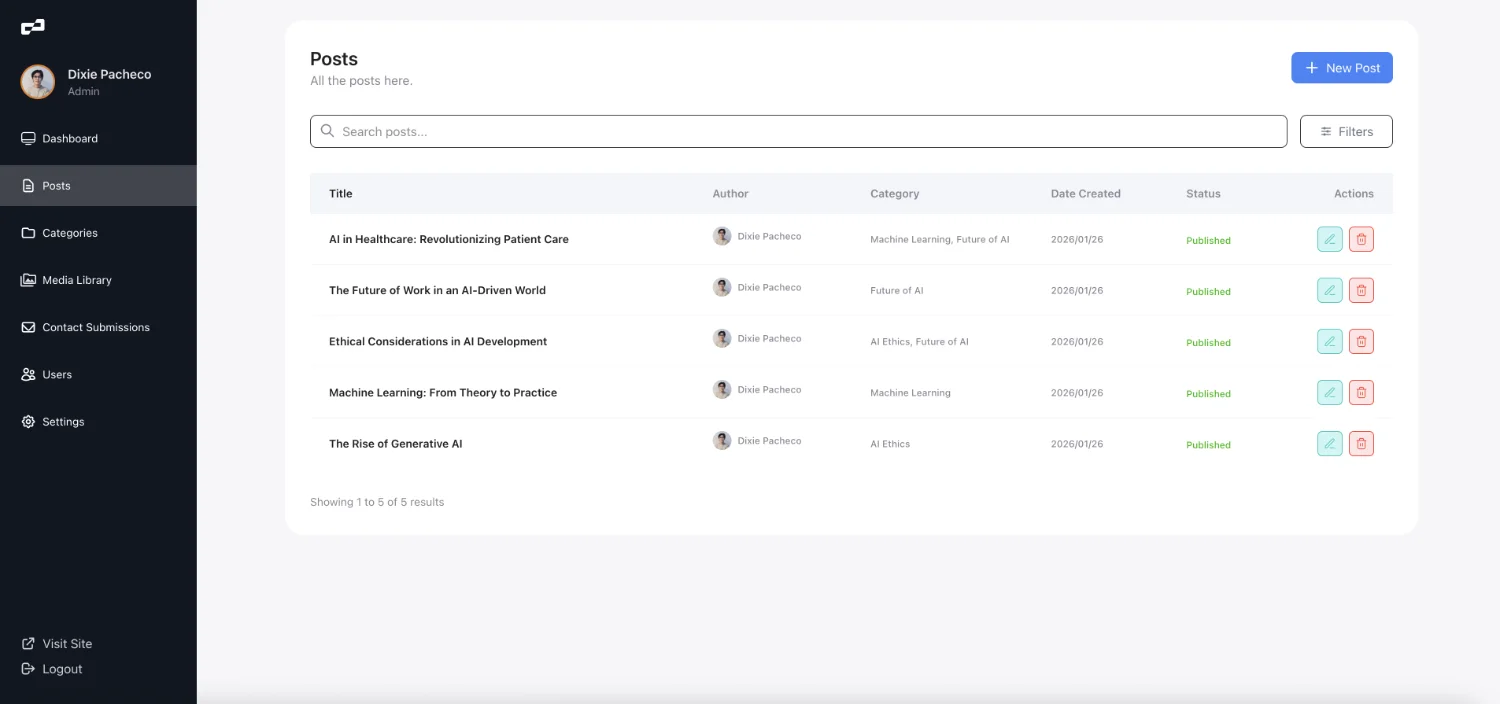
My Custom CMS: Built for Marketing, Not Developers
The headless CMS market wants you to choose between control and usability. Sanity offers structured content but requires developer setup for every change. Contentful charges enterprise prices for basic features. WordPress REST API returns bloated responses full of unnecessary metadata.
I built something different.
Unified Frontend and Backend
My CMS lives in the same codebase as the frontend. No API calls across the internet. No separate admin domain. No sync issues between systems.
Content editors get a clean interface. Developers get full control. Changes deploy instantly.
Scalable by Design
Need to add a new content type? It's a schema change and a component. Want to integrate your CRM? It's a form handler. Need analytics beyond Google? The data layer accepts any provider.
No plugin marketplace. No feature limits. No arbitrary pricing tiers.
Marketing-First Features
Blog management with proper SEO fields. Landing page builders with conversion tracking. Form handlers that integrate with any email platform. A/B testing infrastructure baked in.
These aren't afterthoughts bolted onto a developer tool. They're the foundation. Whether you're looking to hire a web developer in the Philippines or work with an agency, understanding these capabilities matters.The Infrastructure Stack
Technology choices matter less than results. But since you asked, here's what powers the sites I build: SvelteKit handles the frontend and server logic. Svelte 5's runes make state management trivial. File-based routing keeps projects organized. Server-side rendering happens automatically.
Railway provides hosting with zero configuration. Push code, get deployment. Automatic SSL, automatic scaling, no DevOps degree required.
Turso (SQLite edge database) stores content with embedded replicas. Queries run locally on the server, not across the network. Sub-millisecond reads for every page load.
Bun runs the JavaScript runtime. Faster cold starts, lower memory, better throughput than Node.js.
No license costs for the framework. SvelteKit is fully open source. If Railway ever becomes problematic, I can deploy to any platform that runs JavaScript. No vendor lock-in, no enterprise cliffs.
Performance Numbers That Matter
| Metric | SvelteKit (My Stack) | Next.js | WordPress | Webflow |
|---|---|---|---|---|
| Baseline JS Bundle | ~42KB | ~120KB | 100KB+ | 10-50KB |
| Cold Start | <50ms | 150-300ms | N/A (VPS) | N/A (Static) |
| Time to Interactive | ~1.2s | ~2.8s | Variable | ~1.5s |
| LCP Potential | Excellent | Very Good | Variable | Good |
| CMS Item Limits | None | None | None | 2k-10k |
| Exit Cost | Portable code | Portable code | Migration pain | Total rebuild |
These aren't theoretical benchmarks. They're production measurements from sites serving real users.
When Custom Development Isn't the Right Choice
I'm honest about when my approach isn't the best fit: You have an existing React team and codebase. Migrating to SvelteKit means retraining developers and rewriting components. If your organization has deep React investment, Next.js keeps you in familiar territory.
Budget is the only factor. Template sites on cheap hosting cost less upfront than custom development. You get what you pay for, but sometimes cheap and good enough beats expensive and excellent. Check my web design pricing guide to understand what custom development actually costs.You need something live tomorrow. Custom development takes time to do right. If you need a website up in 48 hours, a template solution makes more sense than rushing custom work.
For everything else, including content publishing, my custom CMS handles it. Your marketing team gets a clean admin interface for managing blog posts, landing pages, and content updates without touching code.
What This Means for Your Business
If you're evaluating web technology choices, here's what matters: Performance affects revenue. A one-second delay in page load costs 7% in conversions. Mobile users on slow connections abandon sites that don't respond immediately. Google ranks faster sites higher.
Maintenance costs compound. The $200/month WordPress maintenance retainer becomes $2,400/year, then $24,000 over a decade. Meanwhile, you're paying to not break rather than to improve.
Platform lock-in is real risk. Webflow's pricing can quadruple overnight. WordPress plugin authors can abandon their projects. Building on proprietary platforms means accepting their future decisions.
Custom doesn't mean complicated. A well-built SvelteKit site is easier to maintain than a WordPress site with 20 plugins. Fewer moving parts, cleaner code, lower attack surface. This is what sets a skilled freelancer apart from template-based agencies.Ready to Build Something Faster?



Transform your website into a revenue-generating asset
Partner with an award-winning web designer and web developer from the Philippines, delivering world-class websites to global brands. 15+ years of experience creating sites that convert visitors into customers.
Frequently Asked Questions
-
For developers, SvelteKit is actually simpler than React-based frameworks. It uses standard HTML, CSS, and JavaScript syntax rather than JSX. For non-developers, you won't be editing code directly anyway. My custom CMS provides an intuitive interface for content management. You don't need to understand SvelteKit to update your site.
-
Unlike Webflow or proprietary platforms, SvelteKit sites are fully portable. Your codebase is standard JavaScript that any competent developer can maintain. The site can be deployed to dozens of hosting providers. You own everything, with no vendor lock-in.
-
In typical production sites, SvelteKit delivers Time to Interactive around 1.2 seconds compared to 2.5-4 seconds for WordPress (depending on plugins and hosting). Bundle sizes are roughly 3x smaller. Cold start times are under 50ms versus 300ms+ for PHP-based systems. These aren't theoretical numbers. They're measurements from real client sites.
-
Yes. My custom CMS includes an intuitive admin interface for managing blog posts, landing pages, testimonials, and other content types. You can update text, swap images, and publish new pages without touching code. For structural changes or new features, that's when you'd bring in a developer.
-
SvelteKit excels at SEO. Server-side rendering ensures search engines see complete HTML on first request. Faster page speeds improve Core Web Vitals scores, which Google uses as a ranking factor. The sites I build include proper meta tags, structured data, XML sitemaps, and all the technical SEO fundamentals.
-
You can get WordPress to perform reasonably well with expensive managed hosting ($50-200/month) and aggressive caching. But you're fighting the architecture. Every plugin adds JavaScript. Security patches never stop. The maintenance burden remains. For the same monthly cost, you can have a SvelteKit site that's faster out of the box with zero ongoing security patches.
-
SvelteKit reached version 1.0 in December 2022 and has been production-ready since. Major companies use Svelte in production. The New York Times, Apple, Spotify, and Square all use Svelte components. The framework is backed by Vercel and has an active open-source community. It's not experimental technology.
-
Bun is a JavaScript runtime that replaces Node.js. It handles server-side operations about 4x faster, with cold starts under 50ms instead of 150-300ms. For visitors, this means faster initial page loads. For you, it means lower hosting costs because each server handles more traffic.
-
Headless CMS platforms like Sanity or Contentful add complexity and cost. You're making API calls across the internet for every page load. My CMS lives in the same codebase as your frontend. No external dependencies, no API latency, no separate billing. Content updates deploy with your site instantly.
-
That's the advantage of custom development. Need a booking system? I build it. Want integration with your CRM? Done. Require A/B testing? The infrastructure supports it. You're not waiting for a plugin developer to maybe add a feature someday. We build exactly what your business needs.