
DRP Palette Importer: Paste Colors Into Figma. Skip the File Upload.






Every web design project starts the same way. You pick your brand colors, run them through a palette generator like uicolors.app or tints.dev, and get a beautiful set of shades. The tool gives you the code output. Tailwind config, CSS variables, JSON. Done.
Now get those colors into Figma as local variables. That's where the workflow breaks. Before plugins even existed for this, you were creating each Figma variable by hand. Click "create variable," type the name, paste the hex code, repeat. A 10-shade palette with 5 color groups is 50 variables. That's 50 names typed out, 50 hex codes copied and pasted, one at a time. Then plugins came along, but they wanted you to save your code as a file, format it to match their schema, then upload it. Every project, same steps. Same friction. Same wasted time before you've even started designing. As a web designer and developer who always works design-first in Figma, this was costing me real minutes on every single project. So I built DRP Palette Importer to eliminate that step entirely.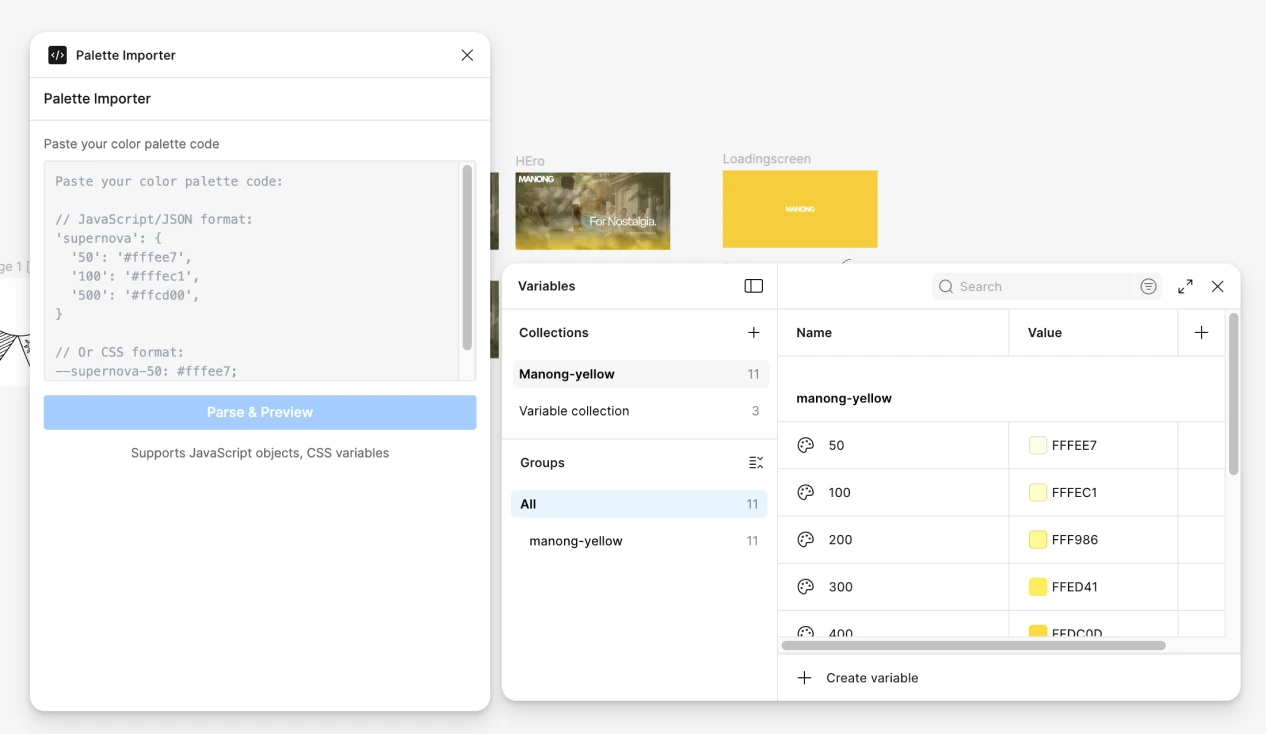
The Problem Every Design-First Workflow Has
If you design before you code, your colors need to exist in Figma before they ever touch a codebase. That means every palette you generate online needs to become Figma local variables before you lay down a single frame.
Here's what that actually looks like without the right tool: The manual way (before plugins):
- Open Figma's local variables panel
- Click "create variable," type the name (e.g., `primary/50`), paste the hex code
- Repeat 49 more times for a full palette
- Realize you mistyped a shade name on variable 23, hunt for it, fix it
The plugin way (current options):
- Generate your palette on uicolors.app, coolors, or tints.dev
- Copy the code output (Tailwind config, CSS variables, JSON)
- Paste it into a text editor
- Save it as a `.json` or `.txt` file
- Open a Figma plugin that accepts file uploads
- Upload the file
- Hope the formatting matches the plugin's expected schema
- Watch it fail because of a missing bracket or wrong nesting
- Fix the file, re-upload, repeat
Either way, a process that should take seconds takes minutes. Every project. And if you update your palette mid-project? Start the whole cycle again.
The Format Lock-In Problem
Most color import plugins pick one format and force you into it. JSON-only importers reject your CSS variables. CSS-only tools can't read a Tailwind config object. You end up reformatting the same color data into whatever schema the plugin demands, which is the exact manual work the plugin was supposed to eliminate.
The Preview Gap
Here's what makes bad imports expensive: most plugins import blindly. You don't see what you're getting until the variables already exist in your file. If the parser misread a value or the naming is wrong, you're manually deleting variables one by one. There's no undo for bulk variable creation in Figma.
The Config-to-Figma Sync Gap
This one hits hardest when you already have a working Tailwind config or design tokens in code. Maybe you generated them with a tool like Runable, or your developer already built a custom palette. Those colors work perfectly in the codebase. But the moment you need to move those tokens into Figma to build out a proper design system, the handoff stalls. You're back to manually creating each variable, copying hex codes one at a time, hoping nothing gets transposed. And when the config changes? You get to do it all over again. Keeping Tailwind configs and Figma variables in sync manually is a nightmare that scales with every color you add.
Lost Color Information
You paste HEX values, but your CSS also uses HSL for theming and OKLCH for perceptual uniformity. Once those values become Figma variables, the alternative representations disappear. You lose context that was useful in your codebase.
Why I Built DRP Palette Importer
I tested every color import plugin in the Figma Community before writing a single line of code. The landscape falls into three categories.
Preset-only plugins inject Tailwind's default color scales. Useful if you're using vanilla Tailwind out of the box. Useless for custom brand palettes, which is every real project for anyone doing bespoke web design.File-upload importers require you to save your code as a file, format it to match their proprietary schema, then upload it. One wrong bracket and the import fails silently or produces garbage variables. These tools were built for design system architects managing enterprise token libraries, not for designers who just need their palette in Figma before they start working.
Code generation plugins solve the Figma-to-code direction. They completely ignore the code-to-Figma requirement. When you're syncing an existing codebase palette back into your design files, these tools offer nothing.
The gap was clear: no plugin let you paste color code directly and get Figma local variables out. No file saving. No uploading. No reformatting.
How DRP Palette Importer Works
The entire flow is three steps: paste, preview, import.
Step 1: Paste Your Color Code
Open the plugin and paste your color code directly into the text input. No file uploads. No saving to disk first. Just paste.
The plugin auto-detects whether you've pasted CSS custom properties or a JavaScript/JSON color object and routes to the right parser.
Supported JavaScript/JSON formats:
- Tailwind config color objects: `'primary': { '50': '#f0f9ff', '100': '#e0f2fe' }`
- Named objects: `supernova: { 50: '#fffee7', 100: '#fffec1' }`
- Standalone objects: `{ "500": "#3b82f6" }`
- Nested objects: `{ "brand": { "500": "#3b82f6" } }`
- With or without quotes on keys and values
Supported CSS formats:
- CSS custom properties: `--color-primary-500: #3b82f6;`
- With `:root` wrapper or standalone declarations
- Auto-groups variables by name prefix
Supported color values within those formats:
- HEX (3-digit, 6-digit, 8-digit): `#3b82f6`, `#fff`
- RGB/RGBA: `rgb(59, 130, 246)`
- HSL/HSLA: `hsl(217, 91%, 60%)`
- OKLCH (CSS parser): `oklch(62% 0.21 255)`
One thing to note: the plugin parses structured color declarations, not scattered hex codes in random text. Your input needs to be in recognizable JS object syntax or CSS variable syntax.
Step 2: Preview Before You Commit
After parsing, the plugin shows a scrollable list of every extracted color. Each row displays the variable name and a color swatch. You can toggle the display between HEX, HSL, and OKLCH to verify values in whatever format you prefer.
This is the step most other plugins skip entirely. You see exactly what will be created before anything touches your Figma file. No surprises. No bulk-deleting variables because the parser misread your input.
Step 3: Configure and Import
Before importing, you set a few options: - Collection name: Auto-populated from your palette name, or type your own
- Overwrite toggle: If variables with the same names already exist, choose to update them or skip
- Include descriptions: Each variable can store a description with all three color formats: `HEX: #3B82F6 | HSL: hsl(217, 91%, 60%) | OKLCH: oklch(62% 0.21 255)`
Hit import. The plugin creates organized Figma local color variables using slash naming (e.g., `primary/500`, `norway/50`), which Figma automatically groups into clean visual hierarchies. The conflict checker warns you about name collisions before anything is written.
The Technical Stack
The plugin is built with Svelte 5 and Tailwind CSS for the UI, TypeScript for all plugin logic, and Vite for the build system. The UI compiles to a single HTML file using vite-plugin-singlefile, which is how Figma plugins package their interfaces.
Under the hood, the format detection checks CSS patterns first, then falls back to JS/JSON parsing. The color converter handles the full chain: HEX to RGB to HSL to OKLCH, so every variable gets all three representations stored in its description regardless of what format you pasted.
For the Figma integration, the plugin uses `figma.variables.createVariableCollection()` and `figma.variables.createVariable()` to build proper local variables, not color styles. This means your imported colors work with Figma's variable modes, design tokens, and the full variable ecosystem for prototyping and developer handoff.
I built this with Anthropic's Claude Code, a CLI coding agent that runs in the terminal. I described the tool I needed. Claude Code ingested the Figma Plugin API documentation and generated the working codebase. As a web developer with 15 years of experience, I knew exactly what the tool needed to do. AI translated that domain expertise into shipping software in a single weekend.What This Says About How I Build Client Sites
My workflow: design in Figma, use AI to translate designs into pixel-perfect code via Figma MCP servers that provide exact node context and design data, then iterate between design and development at a speed that traditional handoffs can't match. DRP Palette Importer is one piece of that system.
This matters for clients because it means faster delivery without sacrificing quality. No design-developer miscommunication. No colors getting lost in translation. No "that's not quite the right shade" back-and-forth that burns billable hours. Companies that outsource web development to the Philippines get this level of tooling built into the workflow from day one. For businesses evaluating agencies versus solo professionals, this is what working with someone who operates across both disciplines looks like. I don't hand off designs to a developer and hope for the best. I am both sides of the equation, and I build the tools that connect them. Explore the full range of web design packages or start a project conversation.




Transform your website into a revenue-generating asset
Partner with an award-winning web designer and web developer from the Philippines, delivering world-class websites to global brands. 15+ years of experience creating sites that convert visitors into customers.
Frequently Asked Questions
-
Yes. Completely free on the Figma Community. I built it to solve my own workflow problem and published it because every designer working with Tailwind configs or CSS codebases hits the same wall.
-
Tailwind config color objects, JavaScript/JSON color objects, and CSS custom properties. Within those formats, it reads HEX (3, 6, and 8-digit), RGB/RGBA, HSL/HSLA, and OKLCH values. The colors need to be inside a recognizable structure like a JS object or CSS variable declaration.
-
Yes. It creates proper Figma local variables, not color styles. Your imported colors integrate with Figma's variable modes, design tokens, and the full variable ecosystem for prototyping and developer handoff.
-
Yes. The overwrite toggle lets you re-import an updated palette without creating duplicates. The plugin detects existing variables with the same names and gives you the option to update their values or skip them.
-
Most plugins require you to save your code as a file and upload it. DRP Palette Importer lets you paste directly. It auto-detects the format, shows a preview before importing, stores HEX/HSL/OKLCH descriptions on each variable, and handles conflict detection. No file saving. No reformatting. No uploads.
-
It does not parse SCSS variables, SVG fills, Tokens Studio format, or W3C Design Token format. It does not accept scattered hex codes without structure. Your input needs to be in JS/JSON object syntax or CSS custom property syntax. It also does not export Figma variables back to code.
-
Yes. I used Anthropic's Claude Code to develop it. With 15 years of experience as a web designer and developer, I knew exactly what the tool needed to do. Claude Code translated that domain expertise into working Figma Plugin API code. This is what AI-assisted development looks like when a practitioner drives the requirements.