
A Client
Portal for Your
Web Design
Project






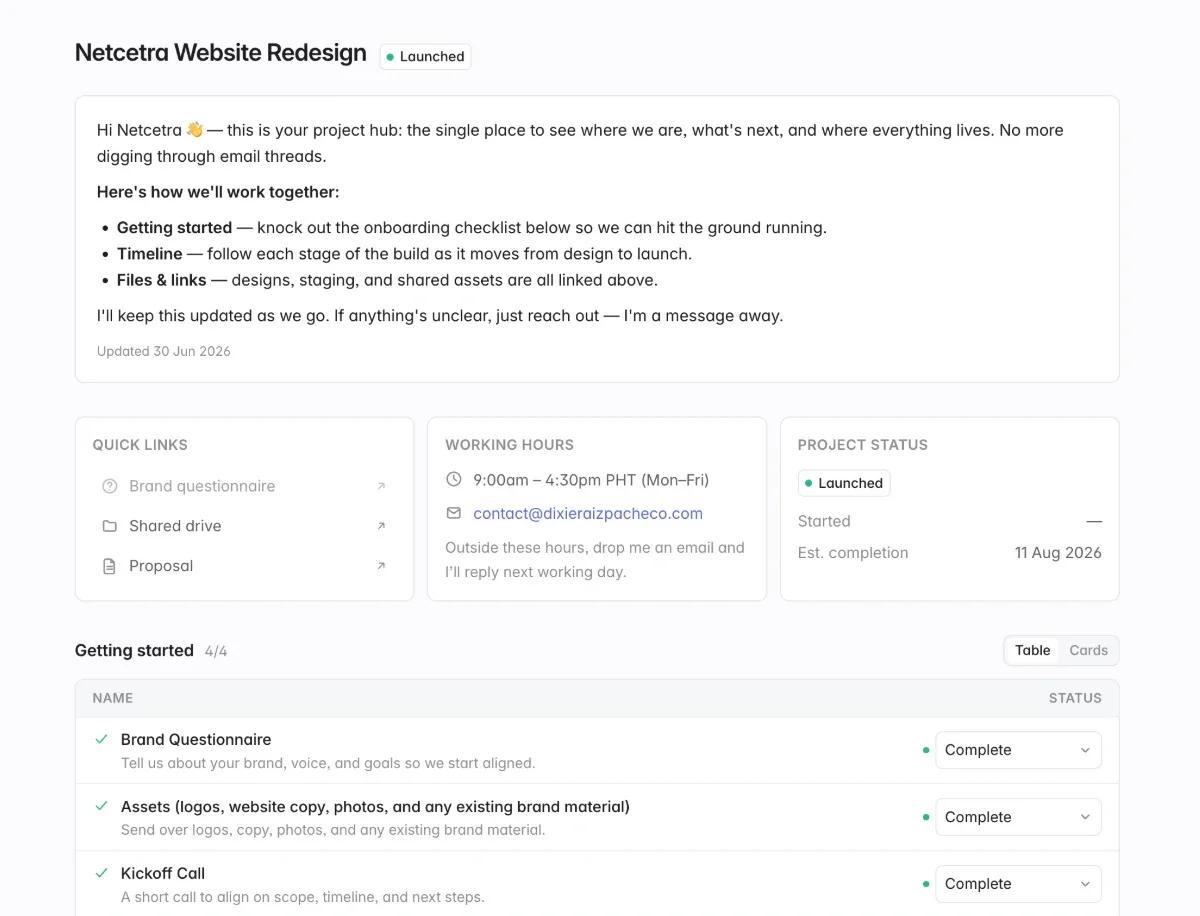
When you hire me, you get a private client portal for your website project. It shows which stage we’re in, what’s done, what’s next, what’s waiting on you and when we expect to launch. You don’t have to email me to ask “where are we?”. You open your portal.
The portal runs on Scopebase, the project management app I built for my studio. You sign in with a link sent to your email. There’s no password to remember and nothing to install.
What your web design client portal gives you
- The current stage of your project and the estimated completion date
- A tracker of every step that concerns you, across all seven stages
- A checklist of what I need from you, which you tick off yourself
- Updates on the work that is moving, with comments on each one
- A project chat with me, where you can attach files
- Links to your staging site, brand guide and shared files in one place
Working with more than one project? Your portal home shows each project with its stage and progress, and anything waiting on you.
Your whole website project on one page
The top of your portal answers the questions clients ask most:
- Welcome note: what your project covers and how we’ll work together
- Quick links: your staging site, brand guide, shared drive, brand questionnaire and proposal
- Working hours: when I’m available, how fast I reply and where to email
- Project status: the current stage and the estimated completion date
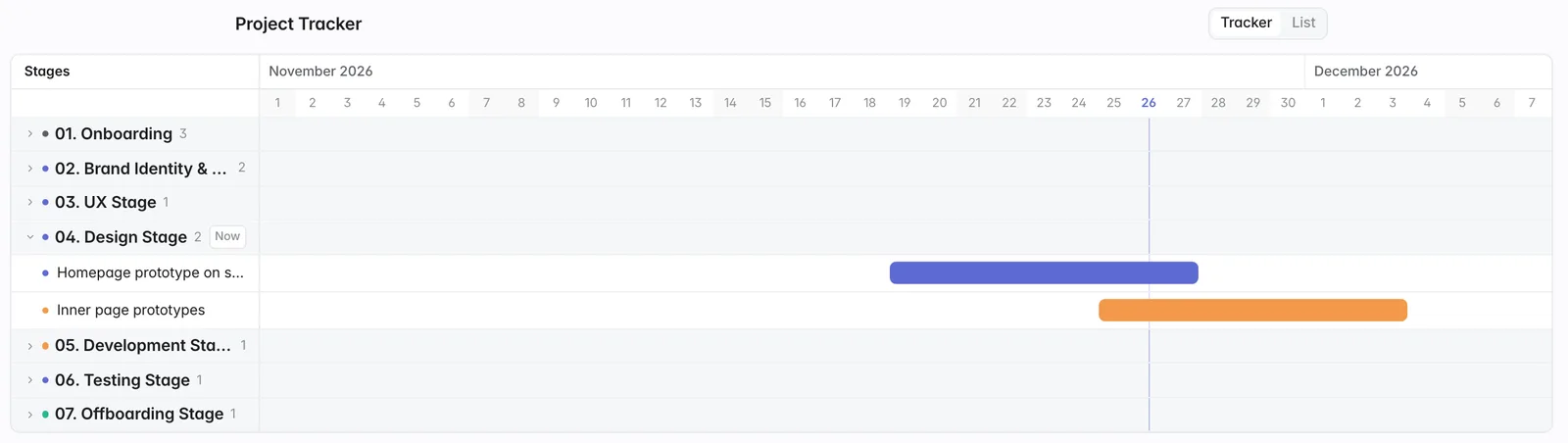
Track all seven stages of your web design project
Your tracker follows the seven stages of my web design process: onboarding, brand identity and strategy, UX, design, development, testing and offboarding. Each step shows as a bar on a calendar from its start to its due date, with today marked and the current stage labelled “Now”. Prefer a list? Switch the tracker to List view.
You only see the steps that concern you. Internal work, like server setup or invoicing, stays on my side, so your tracker stays readable.
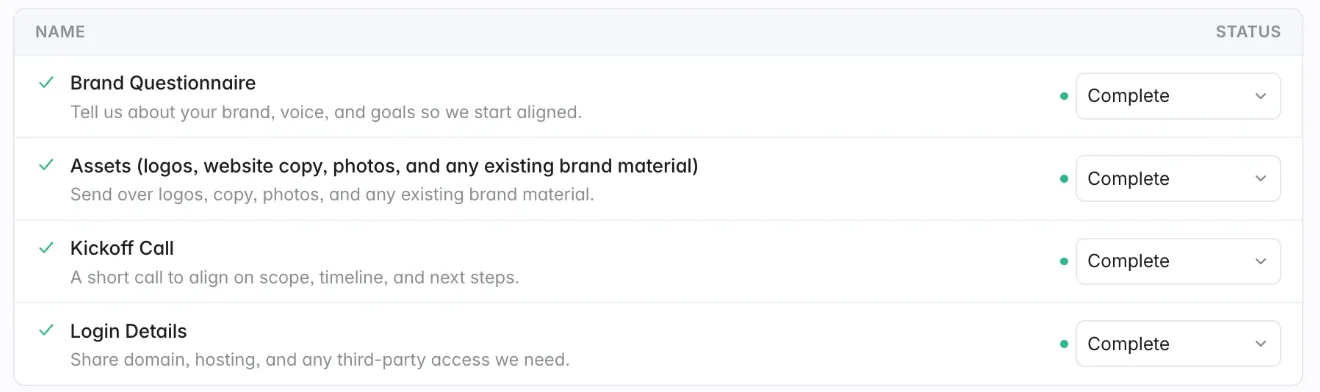
Your project checklist: what’s waiting on you
Every project needs a few things from you early on: the kickoff call, the brand questionnaire, your logo and photos. They appear as a getting-started checklist. You mark each item in progress or complete yourself, and I get a notification when you do. The brand questionnaire is filled in online, inside your portal.
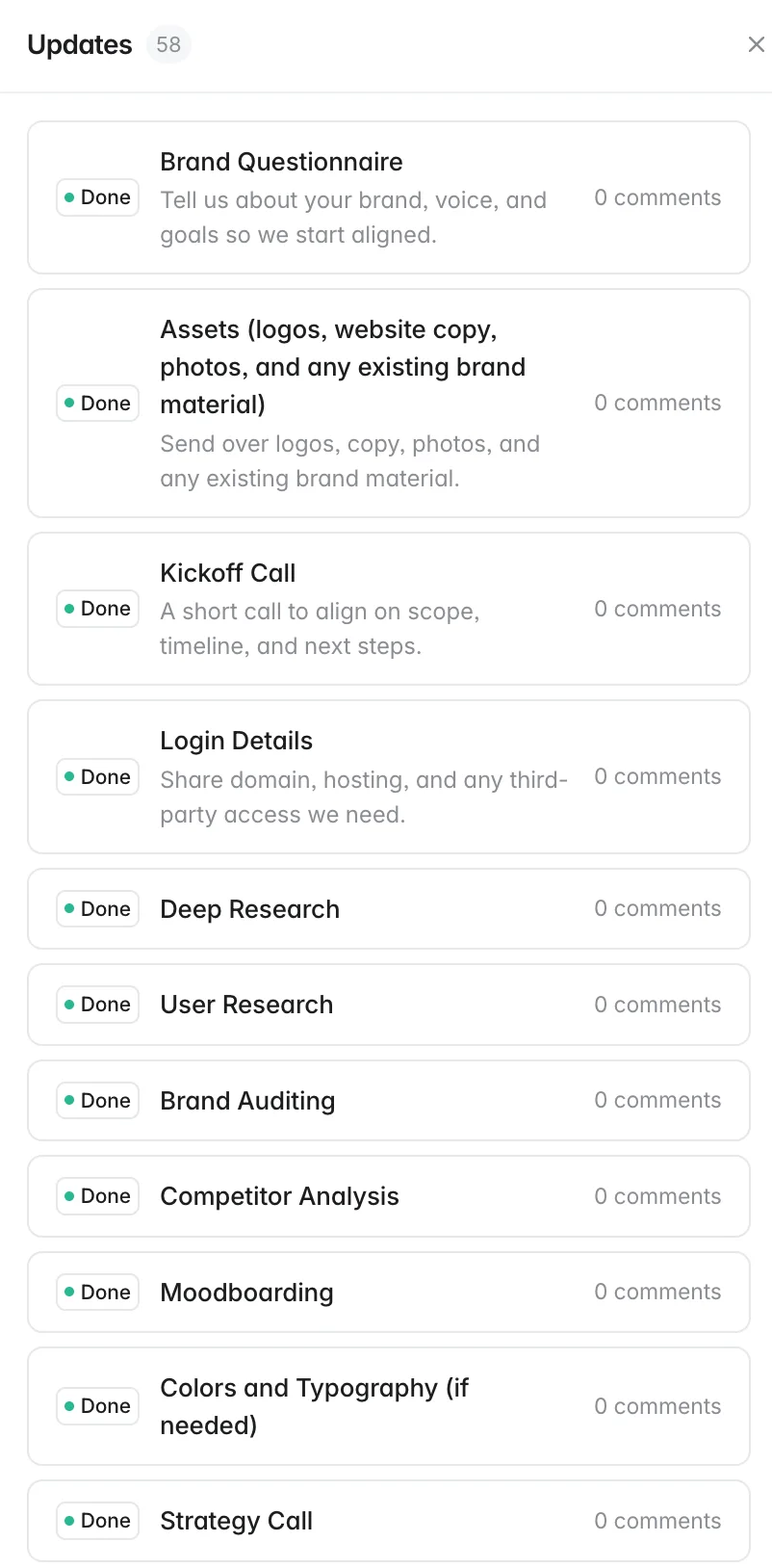
Project updates, comments and chat in one place
The Updates panel lists the work that’s moving: in progress, waiting for your review, approved or done. You can comment on each update, so a question about your homepage stays with the homepage.
For everything else there’s a project chat with me, where you can attach files. Messages stay with your project, so when you come back three weeks later, the history is still there.
Online proposals and invoices
Your proposal opens from a link. You read it, send questions and accept it online. Scopebase records your name, your email and that you have authority to approve it, then I send the service agreement for signature.
Invoices come as a private link that shows the line items and payment details, with a PDF you can download for your records.
Why a client portal makes working with me easier
- You always know where your project stands, without asking.
- You can see what’s holding things up, including anything waiting on you.
- Decisions, files and messages stay with your project, not scattered across inboxes.
- Your portal shows the same tasks and dates I work from, so there’s no separate status report that goes stale.
Your portal works alongside Pirma, where you review and approve your staging site, and Bantay, which watches your website after launch. For a general guide, read what a web design client portal should include.
Transform your website into a revenue-generating asset
Partner with an award-winning web designer and web developer from the Philippines, delivering world-class websites to global brands. 15+ years of experience creating sites that convert visitors into customers.
Frequently Asked Questions
-
Every website project with me gets a private client portal. It shows your project stage and estimated completion, a tracker of the steps that concern you, a checklist of what I need from you, updates with comments, a chat with me and links to your staging site and files. It runs on Scopebase, the project management app I built.
-
With a link sent to your email. There is no password to create or remember. The portal only shows your own projects.
-
Yes. The portal shows the current stage, the estimated completion date and a tracker across the seven stages of my process, with each step drawn on a calendar. It reads from the same tasks and dates I work from.
-
No. Only the steps that concern you appear in your portal. Internal work such as invoicing or server setup stays on my side, so your tracker stays readable.
-
Yes. Each project has a chat with me where you can attach files, and you can comment on any update in the Updates panel.
-
Your proposal opens from a link and you accept it online. Scopebase records your name, email and that you have authority to approve it, and a service agreement follows for signature. Invoices come as a private link with the line items, payment details and a PDF to download.
-
No. Scopebase is a private app for my studio and my clients. It is not open for sign-ups.